Wednesday, August 20, 2008
Six steps to designing a Project Wonderful ad
You can create one in just 6 easy steps using your Flickr account.
1. Look at Project Wonderful and decide what ad size you want to make. This quick tutorial is for the 125x125 square ad.
2. Log into your Flickr account and choose an image. Click on it.
(I made an ad based on the image used for the giveaway blog post so they matched.)
2. Click Edit. Flickr's editing program, Picnik, will open. Be patient, it takes a moment. When it opens, you will see two tabs. One is Edit and the other is Create. You will start out in the Edit tab.
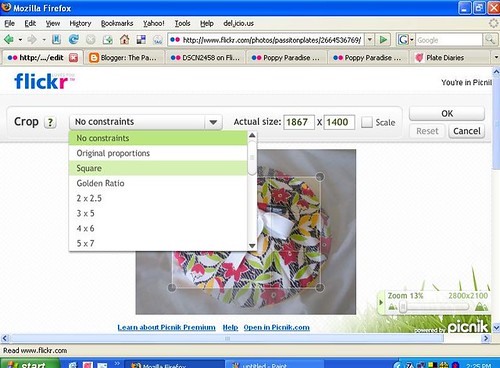
3. Crop your photo. If you are making a square ad, select the square from the drop down box. (These screenshots are from an upcoming blog post... You'll just have to bookmark this blog or subscribe so you don't miss my next Flickr tutorial.)
4. Resize your photo to the Project Wonderful ad size you want to make. In my case, I typed in 125 and Picnik did the rest. When the shape and size are to your liking, click OK.
5. Now for the fun part. Click the tab named Create. Type in your advertising word or words and play with the color, font, layout, and other settings until it's perfect.
6. Save your work. Before you complete the save process, let Picnik know if you want to save a new copy or replace the original. I recommend always saving a new copy so you can use the original for other ads or projects. Save this image to a location on your computer so you can easily upload it to Project Wonderful.
Ta dah! Quick and easy.
And fantastic-looking.
If/when you make one, comment here with a link to your ad. I'd love to see how it turned out. Plus, if you send me a link to your ad, I'll write up a post to be published next week to show off all the ads. Hey, that's free advertising for you.
Ok, also... Come back tomorrow to find out who won the big giveaway!
Tuesday, August 19, 2008
Making money with Project Wonderful
In order to make a little money with Project Wonderful, you'll first need to set up some ad space on your blog. If you have been following these posts for the past few days, you know these ad spaces are called Ad Boxes. It may take a little time (a day or two at most) to get your blog approved initially, since the PW staff needs to make sure your blog is valid and meets their criteria. (They don't like spam blogs or other bogus sites.) Once approved, you can set up your ad boxes based on your preferred size and location of the box on your site.
One last note, I have two ad boxes on this blog; one at the top and another in the sidebar. It took some experimentation to figure out that the best ad box size for this particular blog was to have one header ad at the top and one large skyscraper ad on the side. When I offer more ad boxes, I end up with fewer bids and the price drops. As my traffic grows, it may be worthwhile to increase the amount of ad space, but supply and demand has shown me that for now, two large ads work the best for me. What baffles me about this is that my personal blog, The Adventures of Pam & Frank, has very little traffic, maybe an average of 4 hits per day, but the ad box prices are generally higher there than they are here. My only guess is that different content from one site to another can also affect pricing. Oh. And for the record, I'm not saying the content over there is better than over here. It's just different.
Some things I recommend doing, especially if you're starting out are:
1. Be prepared to fiddle with your ad box over the next week or so until you find what size and placement work best for you. Keep in mind that the price your ad box demands is based completely on supply and demand. The more ad boxes you have available, the lower the bids will be. If you have a lot of traffic and only a few ad boxes, the price will go up as advertisers try to outbid each other for the coveted space on your site.
2. Regardless of how you set your preferences for approving ads, you will need to check your ad boxes every day for at least a few weeks. Why?
- If you set your ad boxes to auto-approve every ad, you will get a lot of bids and ads in your boxes right away, but you will need to check and make sure the the type of ads shown in your ad box(s) are of a nature that you want showing on your site.
My ad boxes were set up this way and despite designating them to be "Safe for Children" I was still getting adult-oriented ads showing graphic renditions of T&A (ummm, that's breasts and bottoms.) I immediately put up a notice on my profile explaining that ads not save for children would be canceled and the bidders would be banned from placing future bids on my ad boxes. Then I did just that. I still occasionally ban bidders for not following these rules. - If you set your ad boxes to approve every bid by hand, plan to check bids at least once a day to approve ads for your site. If you wait too long between checking bids, you run the risk of having no ads in your ad boxes, advertisers will retract their bids, or their funds could be depleted from other bids they have placed before the bid on your ad box is approved.
3. When you see an ad you like on your site, consider adding that advertiser as a buddy so at some point if you decide to only auto-approve ads from your buddies, their ads will continue to be approved for your site.
4. When you see an ad you like on your site, or if you have been earning steady payments on your site from a regular advertiser, go to your PW Admin page and click on their avatar. What you'll want to do next takes just a minute but can create a long term benefit:Send them a message thanking them for advertising on your site and inviting them to continue bidding.
If you have any events coming up where you know your traffic will increase significantly, you may want to let them know ahead of time. Since a traffic increase can increase your ad price, your regular advertisers may appreciate knowing that their ad could be outbid and might want to adjust their bid accordingly to make sure that your extra traffic sees their ad.This is a great way to develop a relationship with your advertisers and could pay off to your advantage in other ways.
Does your advertiser have a blog?Do you think they may modify their bid to make sure they outbid any competition that comes along when your traffic goes up?
They may want to.
Do you think they may blog about your message, giving them a chance to get in on your extra traffic?
Possibly.
Very likely.
Next:
A quick and easy way to make PW ads (like the giveway one shown above)
Don't want to miss a post? Click the subscribe button on the sidebar today!
Monday, August 18, 2008
Advertising on Project Wonderful
One way to find ad boxes to bid on is to surf other blogs and look for PW ad boxes. If they have one or more with a link inviting you to advertise on that site, just click that link to get to their bidding page. From there you can see their traffic stats and ad pricing over the last month, maybe learn a little about that site and their policies regarding advertising they allow on their site, and a link to see all their other ad boxes.
The other way is to go to the PW website and do a search based on your preferred ad box size, how much traffic the site gets, where the traffic comes from, etc. There are a lot of online comix sites, but you can tailor your search by keyword, so if you want to advertise on sites within a specific topic you can search for that. Just like any internet search, if you use general keywords you will have a long list of ad boxes to browse through, and if you use more specific keywords you will see ad boxes that are more in line with your desired niche. From there, you can sort your results based on the ad box price, amount of traffic, alphabetically, etc.
Some things I recommend doing, especially if you're starting out are:
1. Bid $0 or $.01 on as many boxes as you can, even if the current bid is a few cents. When the higher priced bids expire, your ad will be shown in the space until the bidding price goes up again. It's a great way to take advantage of supply and demand pricing and get your ad seen on boxes you may otherwise not have budgeted for.
2. Set up an advertising campaign. You set the parameters, such as the level of traffic to the site, what country a certain % of traffic comes from, keywords used to describe the sites, price range of the ad boxes, etc. This will get your ads to a broad range of sites automatically and you don't have to babysit your ad to keep placing it here and there. This is quite simple to do, as PW walks you through the entire process. It's all point and click.
3. Send a message to the ad box owners where you are having success. Thank them for the opportunity to advertise on their site, point out what you like about their site, and let them know how you have benefited from their ad box. If you have ad boxes on your site, invite them to check it out and consider placing a bid on your ad boxes. It's kind of an "I'll scratch your back if you scratch mine" approach, but joint efforts in advertising is almost always a win-win. If this first step develops into a nice conversation, you could blog about it and let them know about the blog post. They, in turn, may mention your blog post, driving more (free) traffic to your site.
4. Do you have a special sale or event going on? Make up an ad specifically to draw people to that event. Set up a campaign to have PW automatically bid on sites that compliment your event, and schedule your ad campaign to end just before your event ends. An example is the giveaway I have going on through August 20. I set up a campaign with the ad shown below. The ad linked to my blog post and the ads will disappear about 15 minutes before the giveaway ends.
Remember, the key to great advertising is patience and consistency. Once you place your ads, give it a few days, weeks, or maybe even a few months to really see how your efforts are paying off.
Coming up next:
Setting up ad boxes on your sites (or, making money with PW)
A quick and easy way to make PW ads (like the giveway one shown above)
Don't want to miss a post? Click the subscribe button on the sidebar today!
.
.
My August PW campaign
I set up an ad campaign on PW specifically for the giveaway that runs through August 20. When setting up a campaign, I tell PW what kind of bids I want to make and it automatically does the work for me.
In this campaign, I specified that PW should look for adboxes that:
- Support square ads
- Support text and graphical ads
- Have at least 1 page views today
- Have on average at least 20 unique users over the past 5 days
- Have at least 80% of their hits from United States over the past 5 days.
- Describe itself using these tags: women, cooking, baking, cookies, craft, handmade
As you can see, I've had a few thousand views and a couple dozen hits, which gives me a nice CPC (cost per click).
I have two other ads that I'm bidding on by hand (same ad, same goal) on the website Corporette and Lipstick to Crayons. You can see how lower traffic and lower click rate affects my cost per click.
So why on earth am I bidding so much more on Lipstick than Corporette? I checked out their websites and see my target demographic there and I figured it would be worth the higher bid price to get my ad in front of their readers.
I hope that helps!
Oh - one more tip. You can click on each website with an ad box to find out their traffic stats. I feel like my figurative slip is showing by telling you this, because I wish my stats were a lot higher, but it's important for you to know how to see what kind of traffic a site has before you commit to placing a paid ad on their site.
(I guess I'm happy that my stats are not consistantly zero day after day!)